
Showing items from Azure Virtual Desktop

Deploy Azure Monitor for AVD automated

Monitoring user environments will help you get sight of what is going on and will help you solve problems. An Azure Virtual Desktop environment isn’t an exception. It is recommended to configure a monitoring environment. In this post, I will show how to deploy Azure Monitor for AVD fully automated.

Continue Reading
Azure Virtual Desktop Image Management Automated - Part 3 Create AVD sessionhosts on image version with ARM

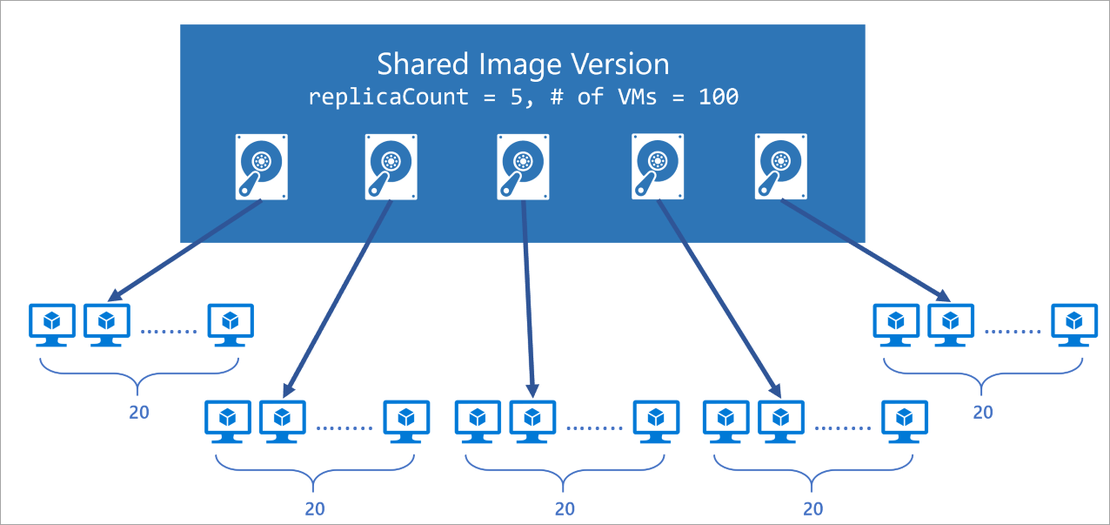
This article is serie of posts about AVD Image Management Automated. In this part we are going to add new sessionhosts to an existing AVD hostpool based on a ARM template.

Continue Reading

Azure Virtual Desktop Image Management Automated - Part 2 Save AVD image with Sysprep as Image Gallery version

This is part two of a serie posts about AVD disk management. In this blogpost I will explain how to finish a disk with sysprep and deploy it as a version into the Azure Shared Image Gallery automated.

Continue Reading

AVD Image Management Automated - Part 1 Create an AVD image version based on the existing config with PowerShell

This article is part one of a series of posts about AVD image management automated. In this first part, I will describe how to create and connect a new disk (based on a snapshot) to a new Azure VM based on the existing sessionhost configuration. This will save a lot of extra parameters like VM size, network settings, and type. After the VM is started you will get the information on how to connect to the VM by RDP (3389) with specific credentials specially created for this VM.

Continue Reading